Simulator
🏡 Sketch your home, draw your furniture, and bring it to life!
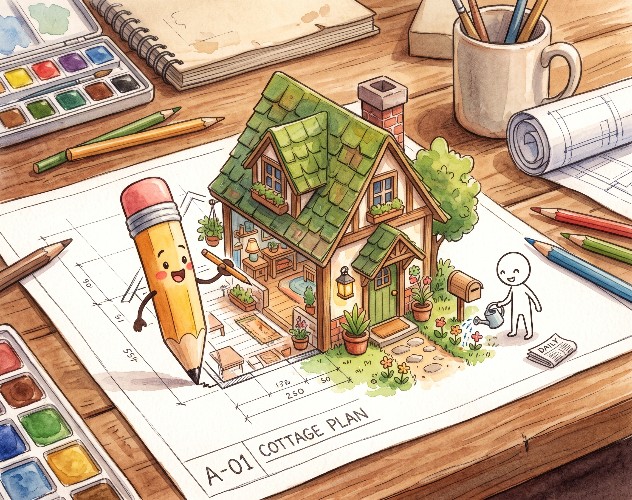
Hand-Drawn Home Simulator (Doodle Home) is a cozy creative life simulator where everything you draw with pencil and paper comes to life in a living, interactive world.
Draft your architectural blueprint from scratch, hand-sketch custom furniture in your studio workshop, landscape your front yard, and care for your doodle resident by fulfilling daily needs, landing jobs via the morning newspaper, and sharing your home in an online neighborhood.
✨ Key Features
- 📐 Blueprint Workshop: Draw walls, layout rooms, place doors, and architect your ideal cozy floor plan.
- 🖌️ Doodle Crafting Studio: Hand-draw custom beds, sofas, stoves, TVs, and fridges. Every doodle becomes an interactive, functional in-game item!
- ☕ Living Needs Simulation: Keep your resident happy and healthy—feed them, cook meals, recharge energy, use the bathroom, and watch TV.
- 📰 Daily Newspaper & Careers: At 9:00 AM, the delivery truck drops off the morning paper on your lawn. Read daily events and apply for scheduled jobs.
- 🚗 Commute & Transportation: A shuttle car picks up your resident before their shift and brings them back home with earned coins.
- ☁️ Cloud Neighborhood: Upload your creation to the cloud and browse neighbor homes lined up along both sides of the suburban street.
- 🌅 Dynamic Day & Night Cycle: Watch morning light transition into golden sunsets and serene, warm nighttime lamp lighting.
🎮 Controls
💻 Desktop / PC
- Left Click: Walk to point, interact with furniture, pick up the newspaper, and select UI buttons.
- Right Click + Drag (or Middle Mouse): Pan camera around your plot and neighborhood street.
- Mouse Wheel: Smooth zoom in / zoom out.
- Camera Widget: Rotate view 90 degrees or reset zoom via HUD icons.
- Drawing Studio: Click and drag with mouse to sketch or erase strokes.
📱 Mobile & Tablets
- Single Tap: Walk, interact with items, open mailbox, or read news.
- One-finger Drag (Canvas): Freehand drawing in the Blueprint & Furniture pads.
- Touch & Drag (World): Pan the camera across your yard and street.
🏡 ¡Dibuja tu casa, crea tus muebles y dales vida!
Simulador de Hogar Dibujado a Mano (Doodle Home) es un simulador de vida y construcción creativa donde todo lo que dibujas con lápiz y papel cobra vida en un mundo interactivo.
Diseña el plano de tu casa desde cero, dibuja cada mueble en tu taller de bocetos, decora tu jardín y cuida a tu habitante satisfaciendo sus necesidades diarias, consiguiendo empleo a través del periódico matutino y compartiendo tu vecindario en la nube.
✨ Características Principales
- 📐 Taller de Planos y Construcción: Traza muros, habitaciones, puertas y define la distribución de tu hogar a tu gusto.
- 🖌️ Taller de Dibujo de Objetos: Dibuja tus propias camas, sofás, cocinas, televisores y refrigeradores. ¡Cada dibujo se convierte en un objeto físico funcional!
- ☕ Simulación de Vida y Necesidades: Tu habitante come, duerme, se asea, se divierte y socializa. ¡Cocina recetas e interactúa con el entorno!
- 📰 Periódico Matutino y Empleo: Cada mañana a las 9:00 AM el camión del diario deja el periódico en tu acera. Léelo para enterarte de noticias y postularte a ofertas de trabajo con horarios reales.
- 🚗 Transporte Laboral: Un automóvil corporativo pasará a buscar a tu habitante para llevarlo a su jornada y devolverlo con su salario.
- ☁️ Vecindario Conectado: Sube tu casa a la nube para que otros jugadores la visiten y descubre las casas de tus vecinos construidas a ambos lados de tu calle.
- 🌅 Ciclo Dinámico Día / Noche: Observa el amanecer, atardecer y la noche con iluminación ambiental acogedora.
🎮 Controles del Juego
💻 En Computadora (Escritorio)
- Clic Izquierdo: Interactuar con objetos, hacer clic en el suelo para mover al habitante, recoger el periódico o seleccionar herramientas.
- Clic Derecho + Arrastrar (o Rueda del Ratón): Desplazar la cámara (Pan) por la parcela y la calle.
- Rueda del Ratón (Scroll): Acercar o alejar zoom (Zoom In / Zoom Out).
- Botones de Cámara: Rota la vista 90° o restablece la cámara con los botones de la barra superior.
- Pincel / Borrador en Taller: Clic y arrastre libre para dibujar o borrar.
📱 En Dispositivos Móviles y Tablets
- Toque simple (Tap): Caminar, interactuar con muebles, abrir el buzón o recoger el periódico.
- Arrastrar con 1 dedo: Dibujar en los talleres de diseño y bocetos.
- Arrastrar / Deslizar en el mundo: Mover la cámara por la parcela.
Leave a comment
Log in with itch.io to leave a comment.